




Microsoft Office LTSC 2024 Pro Plus | Multilingual | 64bit | Auto Activation
Microsoft Office LTSC 2024 Pro Plus – Standard + Visio + Project v2408 Build 16.0.17932.20842 (x64) Multi RePack [FTUApps]
Office LTSC 2024 Professional Plus provides a familiar set of applications such as Word, Excel, PowerPoint, Outlook, OneNote, OneDrive, and Access, and includes features introduced in the enterprise versions of Microsoft 365.
Among the new features are dynamic charts in Excel, improved search and appointment creation in Outlook, and improvements in performance, security, and accessibility. Publisher – goodbye, instead of which a parasitic ai.exe process is now launched with applications, but an option to remove this misunderstanding has been added to the build. I did not find any compelling reasons to upgrade from Office 2021, maybe you will succeed.
Standard + Visio + Project, Etc!
General Information:
Version: 2408
Build: 16.0.17932.20842
Languages: Russian, English, Ukrainian + Office LP Integrator
Treatment: Not required, Just install, Automatic
Activation: Cured/AAct activator from Ratiborus, MAS
Extensions: Office Tab Enterprise
Command line: RePack features mentioned in Readme.txt
Recommendation: For successful activation, it is recommended to disable your antivirus software.
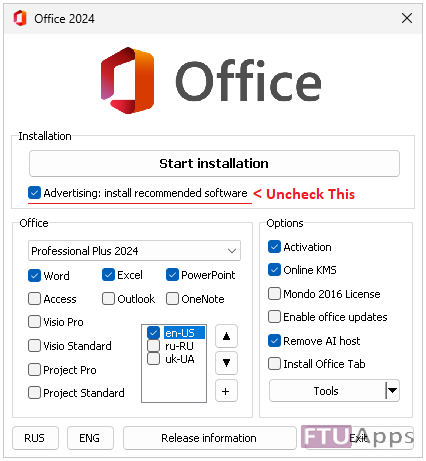
Notes: On the installer page, install free adware is ticked. Be sure to uncheck the box.
Changes in the assembly:
– [2026.06.09]
– Updated: Office 16.0.17932.20842
Operating System:
– Windows 10, 11 (64bit)
Screenshots:


Homepage: https://www.microsoft.com/
Run Autorun, make selection, Install & Enjoy, No activation is required / Brief Instruction is Included in the folder!
AUTORUN

Size: 3.49GB






On Windows 11 X64, I ran Autorun.exe, selected the language, but when I click “Start installation” the installation does not start.
Select the correct package, and then install, also, make sure to tick ”KMS online from utilities tab.
If problem still appears at your end? unintsall any previous version and then reload.
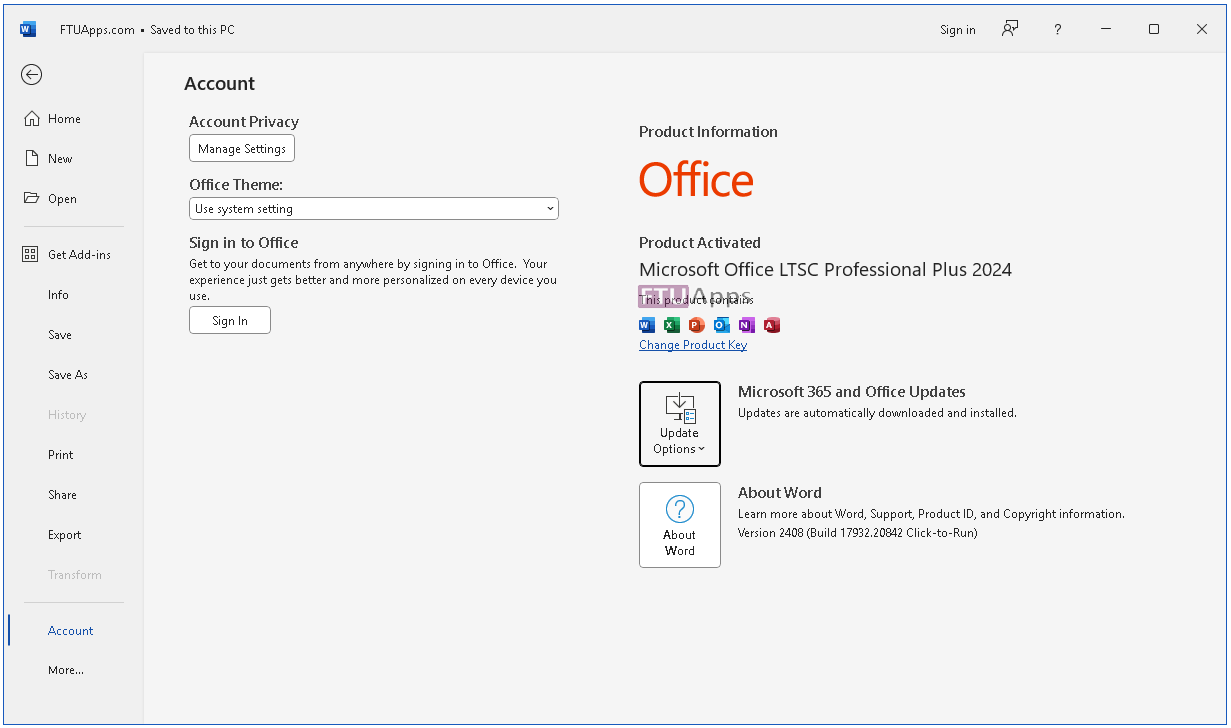
NOTE: This is tested version as always, tested on Sandbox and Windows 10 Pro x64, the screenshots are real, not taken via Google.
can i use this office offline?
Download and yes, you can install and use it offline anytime!
If I connect to the internet will the licence be revoked?
No, you can install it being connected to internet and using your account just like that, No activation disturbance unless you click any auto updates or manually update anything.
Just install and use freely, no issues with activation.
I can’t get the file that i needed, it direct me to TrendinQQ.com instead.
Any Help??.
Thanks
Click >> How To Download >> Available on the site header And see how it works.
Direct link: https://ftuapps.farlad.com/how-to-download/
Can’t download file when click Download,instead bring to TrendiQQ.com web site.
No torrent links
any help?
Click >> How To Download >> Available on the site header And see how it works.
Direct link: https://ftuapps.farlad.com/how-to-download/
Is it possible to add the Slovenian language so that it is not only English and Russian if possible
You can download the Slovenian language pack from Microsoft Office
To download a language pack for Microsoft Office, you can try the following steps:
Go to https://support.microsoft.com/office/language-accessory-pack-for-office-82ee1236-0f9a-45ee-9c72-05b026ee809f in a web browser
Select your preferred language from the Which Language do you need drop-down box
Click the Download (64-bit) link
Save the OfficeSetup.exe file to your system drive
Double-click OfficeSetup.exe
Click Yes when prompted to grant administrative privileges to the application
Follow the instructions
After installing the language pack, you’ll need to configure Microsoft 365 for your new language preferences. This will affect all of your Microsoft 365 applications.
You can also change the language used in Office menus and proofing tools by doing the following:
Open any Office application
Select File > Options > Language
Under Office display Language, select the language you want to use
Select Set as Preferred
I am a Chinese user, I like this software very much, but there is no language option in the package, what should I do?
Kindly, search on Google how add language on MS and follow the instructions, the package have multiple languages but for default installation it is English!
is it work on Mac
No, it doesn’t, will try to add Mac version.
Can you guys ping when Mac version was available
Subscribe us among Telegram channel, so, you will get notification on time.
Anyway, here is the MacOS version: https://ftuapps.farlad.com/microsoft-office-2021-ltsc-v16-87-vl-multilingual-macos/
When downloading the file it’s only download file name “FTUApps.com-Microsoft-Office-LTSC-2021-Professional-Plus-Standard-Visio-Project-16.0.14332.20763-2024.08.torrent” of 23 kb..? Please help
Lolz, it’s. Torrent, use it on torrent client and start to grab content, google search how torrent works.
i hope its virus free, i had to add exclution in defender
Thank you so much… Must I be online when it’s installing?
Hi FTUApps! I already installed it and it’s working pretty well. My only question is, why can’t I delete the ISO file? It’s not mounted or anything, I just can’t delete it. It says it is used by system and I don’t even know what that means.
Don’t panic, any of the file being used by system for specific reasons, no need to panic, it happens with all of us, cause, the large amount of characters/letter in folder name is very common, try shortener the title and trash, if that doesn’t work, it’s simple to do it this way.
Install a freeware ”iObit Unlocker” and right-click on the folder to unlock it, You can use this option from front drop-down menu > Unlock & Trash < Bam! It will exit it from the system and trash it away.