



Multilingual | 32bit / 64bit | Silent RePack
BurnAware Professional v19.1 Multilingual Pre-Activated [FTUApps]
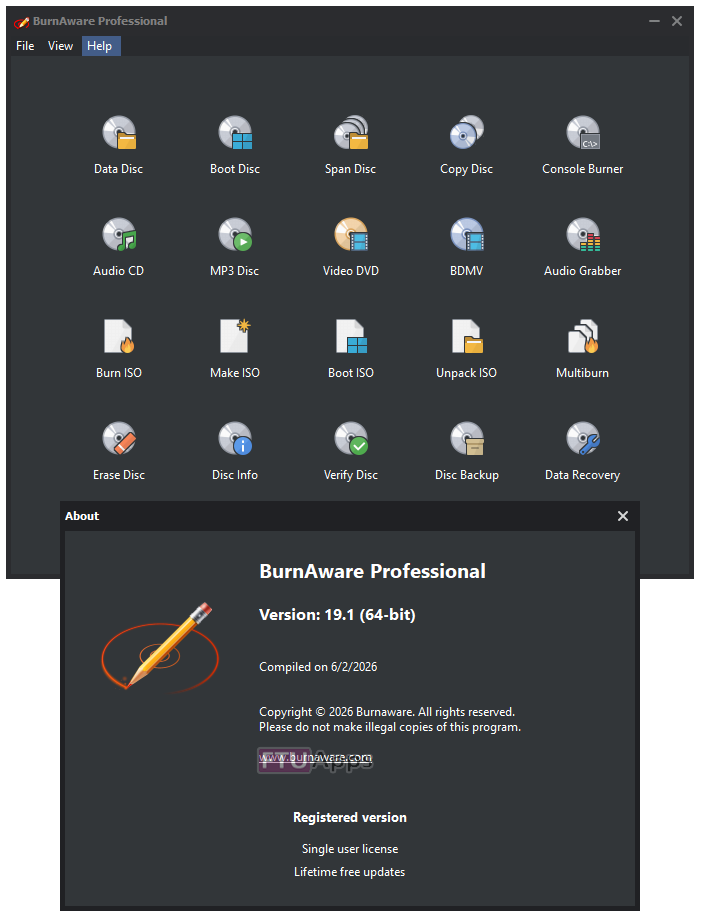
BurnAware Professional / Premium is a powerful CD, DVD and BD disc burning solution intended for users who need maximum control over every aspect of the burning process and use multiple burners for mass-production of various discs and quick creation of disc-to-disc copies. It’s a solid piece of software that will help you cope with your daily burning tasks faster and more efficiently. The program enables users to create data discs (CD, DVD, Blu-Ray, bootable CD and DVD discs) and discs with multimedia content (Audio CD, MP3 discs and DVD video discs). Apart from this, BurnAware Pro will help you create and burn ISO images (ISO and CUE/BIN image files supported), erase rewritable discs, burn multisession discs and even extract specific files from disc sessions and tracks from Audio CDs. A simple and intuitive interface of the program will make even novices feel comfortable with the program features.
Features:
• Back up or copy your files to CD, DVD or Blu-ray Discs.
• Supports CD-R/RW, DVD-R/RW, DVD+R/RW, BD-R/RE and DVD-RAM media, including high-capacity double-layer media.
• Supports UDF (Universal Disc Format 1.02-2.60), Bridge and the ISO9660 file system, including Joliet Unicode extensions.
• Create a bootable CD or DVD. Use it as a very big floppy boot disc for recovery purposes.
• El Torito creation support with advanced options: emulation type, sectors, platform, load segment and boot message.
• Append multisession discs. Discs can be used for sequential recording, as the new data will co-exist perfectly alongside previously recorded data.
• Create Audio CDs. Play a CD on your traditional CD player or car stereo.
• Burn disc images. Create a CD, DVD or Blu-ray disc from a disc image file. Supports ISO and CUE/BIN image files.
• Make standard or boot ISOs. Back up or copy your files to an ISO image file. Supports different file systems and ISO levels.
• Copy disc to ISO image. This feature can be used for disc backup, as well as for disc copying.
BurnAware Additional Features:
• Burns data across multiple CDs, DVDs, Blu-ray discs
• Creates and burns standard / bootable Data CDs, DVDs, Blu-ray
• Burns ISO Image to multiple drives simultaneously
• Creates and burns Audio CDs, MP3 Discs, DVD-Videos, BDMV / AVCHD
• Creates standard / bootable ISO Images, burns various Disc Images
• Copies standard / multimedia CDs, DVDs, Blu-ray to Disc Images
• Erases rewritable Discs, verifies Discs, displays Disc / Drive details
• Copies from Disc to Disc, direct CD, DVD, Blu-ray copying
• Extracts audio tracks in various formats from Audio CDs
• Recovers files from unreadable Discs and separate sessions
What’s New:
– https://www.burnaware.com/whats-new.html
System Requirements:
– Windows XP, Vista, 7, 8, 8.1, 10/Server 2019/2012 (32bit/64-bit)
Homepage: https://www.burnaware.com/index.html
Install & Enjoy, No activation is required / Instruction is Included in the folder!
x64

x86
Size: 123MB





it does not work from baw 18.1 to baw 18.2. its turned up as a unregged version
We never recommend Upgrading apps, Clean uninstall, then install the new one, So, best things to do: Clean Uninstall (use revo uninstall/etc) wipe all it’s files/registry. Reboot system, Install v8.2.
Before you do, just make sure your AV doesn’t eat the crack, which means Exclude the .exe via AV, allow it, because all the alarms are True false-positive, no harm, nothing. Good luck!